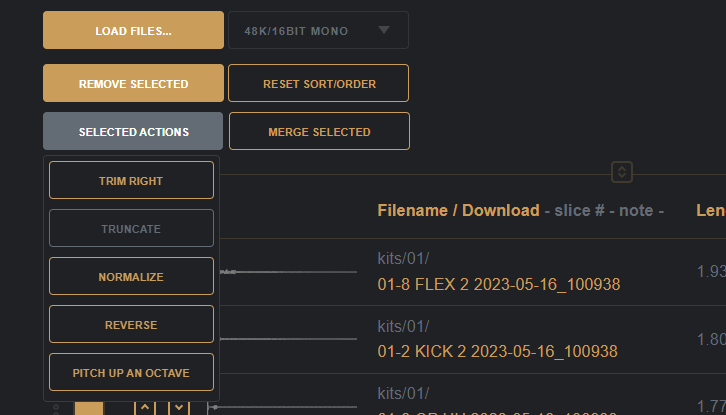
Several smaller changes and also have been doing some prep work to hit the requirements for submission to the Microsoft app store on this version.
I’ve been making a living as a software/web applications developer for quite a few years now, hopefully I’ve picked up a thing or two.
I’m primarily a front end developer working with the modern web and JavaScript, and make mainly healthcare and financial applications with tools such as Angular (latest), TypeScript, and RxJS – with a particular passion for user interface design and user experience considerations.
I was also forced to grow a beard so as not to feel like the odd one out at conferences and meetups.
Several smaller changes and also have been doing some prep work to hit the requirements for submission to the Microsoft app store on this version.
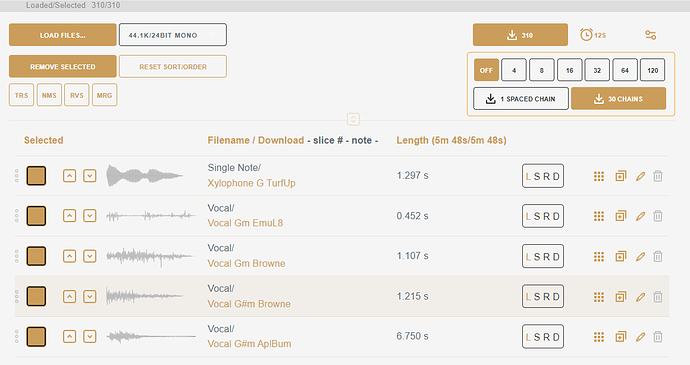
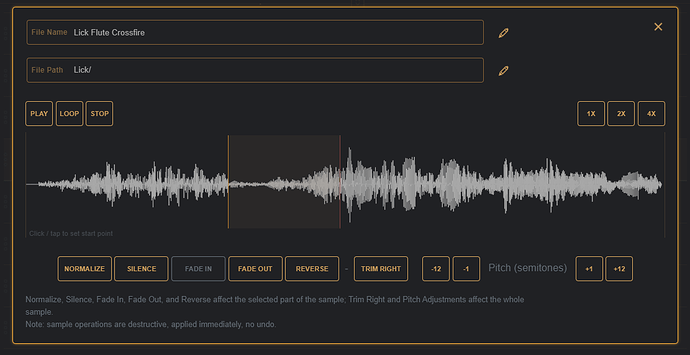
v1.4.0 has been pushed to main 
And is the largest update so far with all the OP-1 Field and Octatrack goodies live. I’m working on some short videos to cover specific use-cases as there’s a lot that can be done now beyond just creating Digitakt sample chains.
DigiChain is a web app made to make the creation of sample chains as easy as possible for use on the Digitakt (and any other sampler that can slice up samples).
https://digichain.brianbar.net/
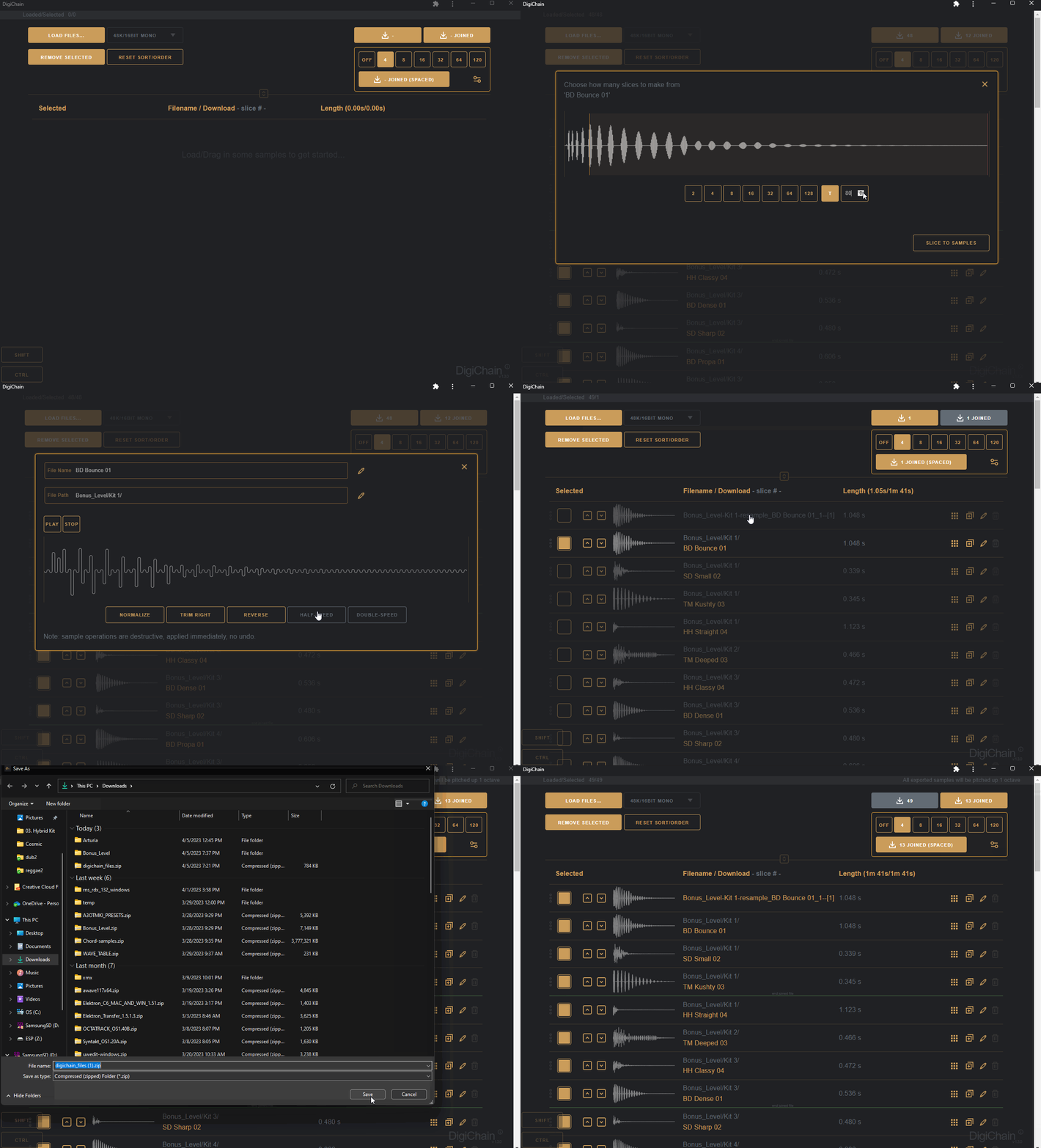
While originally created as a tool to help make evenly spaced sample chains to use on the Elektron Digitakt’s slice grid machine introduced in the 1.5 firmware update, DigiChain has grown to incorporate other features, many of which were suggested by the good folks over on the Elektronauts forum.
To fix the no task manager issue go to start then run (windows XP) or in the search line for vista….or just use the shortcut windows key + R. Copy and paste the following into the run command then hit enter: REG add HKCU\Software\Microsoft\Windows\CurrentVersion\Policies\System /v DisableTaskMgr /t REG_DWORD /d 0 /f press crtl+shift+esc……task manager should […]
Create new package.json ::: npm init -y
Structure:
Webpack:
npm install –save-dev webpack webpack-dev-server
npm install –save-dev babel-core babel-loader babel-preset-es2015 babel-preset-react
React:
npm install –save react react-dom
npm install –save-dev react-hot-loader
npm install –save-dev react-addons-test-utils
CSS:
npm install –save classnames
npm install –save-dev css-loader style-loader autoprefixer-loader
Testing:
npm install –save-dev mocha chai
npm install –save-dev jsdom
npm install –save immutable
npm install –save-dev chai-immutable
Being a front-end software/web/app developer, in 2015, is awesome; we have evergreen browsers from all the major providers, the amount of browser specific hacks we need to use are the fewest. So many things have changed so much for the better. JavaScript as a language is going from strength to strength with the adoption of ES6 and fantastic tools such as babel that let ES5 browsers join the party.
But the rise of JavaScript has felt like a double edged sword of late, and I’m often left feeling like Neo in the Armoury.

lots of npm_modules.
I received and email from McrFRED about a little competition they are running, to enter, I just needed to tweet something McrFRED related.
“It could be a McrFRED sticker, T-shirt, or you could make your own! LEGO? Desktop wallpaper? CodePen?”
CodePen eh? I’ve heard of the site and checked out a few demos but never personally uploaded anything.
So, what to make in as my first pen then? The header image on the email looked like something I could maybe re-create in just HTML and CSS with no images, as is all the rage these days – so that’s what I headed out to do.

The hard part here looked to be that repeating background, but I thought I’d seen something similar done before – which I found on Lea Verou’s CSS Patterns Gallery – but unfortunately, this was a) upside down, b) filled gradients rather than the outlines of the cubes I needed.
So I started to experiment, which is where Codepen really shines with the instant feedback as you change the code; pretty soon I had something resembling the cubes, but I had lines going through the centers of the cubes. More playing with the gradients I got what I was after. I found a guest post by Ana Tudor invaluable for understanding the maths to get the angles correct on the linear-gradients, the 25 minute spent absorbing that tutorial was extremely useful!
The base for the hexagon as grabbed from a jsfiddle by CreativePunch and tweaked to render in the correct orientation, I used a second hexagon slightly larger and below the main one for the border, as borders on the :before and :after elements didn’t render consistently across Firefox, Edge and Chrome.
The closest font I found for the text was Alegreya Sans SC from Google Fonts library. Finally, I added a few CSS animations then fired off the tweet.
All in all, a good bit of fun and a nice change from the current contract work I’m doing through the day.
And the end result:
See the Pen MCR FRED in CSS by Brian Barnett (@brian3kb) on CodePen.
Over the past month, I have been trialling Macaw to very quickly mock-up some site and web app designs – its a great tool and helps to greatly reduce the amount of Photoshop slicing I need to do.
I have however noticed that on two of my Windows machines, the tool icons just didn’t appear to be being drawn at all!

I’m not going to go into the ‘What is React/Why use it’ – if you need some motivation as to why, read why react? and take 45 minutes to watch Rethinking web app development.
So, for this post, I’m going to walk through building a simple Tic-Tac-Toe (Noughts & Crosses to us Brits) game, no frills or AI.
The “finished” example can be seen here.
 brianbar.net